 Colorea
How to color by number
Color by number is the easiest way to finish a detailed picture: every area has a number, and every number is a color. You don't need to draw or choose colors. This guide explains how it works and how to make the most of it.
What color by number is
The picture is divided into areas closed by lines. Each area holds a number, and below there is a palette with the same numbers, each with its color. Area 3 takes color 3, area 7 takes color 7, and so on until nothing is left blank. When you finish, the whole picture appears, with the colors chosen when it was made.
It is the same idea as the paint-by-number kits of the 1950s, which have a history of their own, but on a screen: no paint that dries and no coloring outside the lines.
Step by step
- Pick a picture for your level. If it's your first time, start with a Medium one: they have from about 80 to about 700 areas, and the simplest take a few minutes.
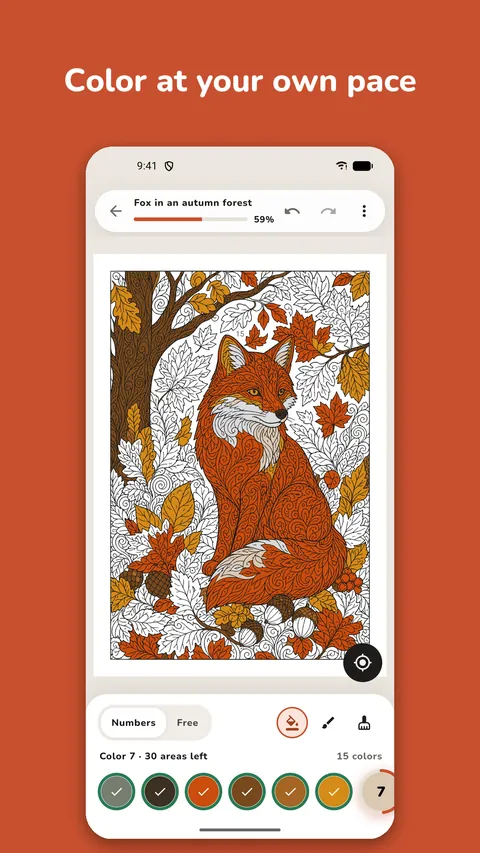
- Pick a color from the palette. In Colorea, the picture opens with the first color you still need.
- Tap the areas with that number. Each tap fills the whole area, so there's no need to be careful with the edges.
- Pinch to zoom in to read the small numbers, and zoom out to see how the picture is going.
- When a color is done, move to the next one. In Colorea the palette jumps to the next color with areas left.
- Repeat until no area is left. Your artwork saves itself, so you can stop and carry on another day.
How to read the numbers
- The number goes where it fits. Small areas have small numbers: zoom in until you can read them. Colorea lets you enlarge the picture many times over.
- The same number appears in many places. The sky can be one big area or twenty small ones between the branches of a tree.
- Look at the number, not the color. Two almost identical greens have different numbers, and they are easy to mix up.
- No number, no color. If an area has no number, it stays white: it's the paper.
- If you tap an area of another color, Colorea doesn't fill it and tells you which color it is.
How not to miss an area
The hard part isn't coloring, it's finding the last areas: a tiny gap between two lines that slipped past you. For that:
- Watch each color's ring. It fills up, and when it's full there are no areas of that color left.
- Use the find button (◎). It takes you to the next missing area of the chosen color, zoomed in just enough to see it. On your phone you get 20 finds a day and, if you run out, a short video adds 20 more, only if you want it. In the browser there is no limit.
- Go through the picture in order, top to bottom, as if reading, instead of jumping around.
By number or freely
Colorea has two modes. By number follows the picture's colors. Free lets you choose any color, with a fill bucket, a brush and an eraser. You can switch whenever you like. If you try free mode, the guide on how to combine colors will help.
Keep reading

Try coloring
Free, no account needed.